Each key or lockbox you add to a Client Profile can have a "Reference." This is a security layer for your keys and lockboxes and you can search by a Reference if you find a key only labeled by a number or other reference.
More About Key and Lockbox Management
When you receive a client's house key, you can add it to their Client Profile. Alternatively if a Client has a lockbox containing a key at their property, these two can be added to a Client Profile. A client can have as many keys/lockboxes as needed and you can code it by giving them a Reference. Keys can be left unassigned until the sitter needs it, or you can assign a key to the sitter straight away.
Under Key Management in the Key List Report, you can view all Unissued Keys, all keys issued to any staff or filter to view keys issued to one staff, as well as search by Key Reference. You can reassign keys in bulk using this report and it is helpful to maintain an inventory of keys or review physical keys with staff. Lockboxes are also listed in the Key List Report.
The report displays the following columns:
- Client Name
- Client Ref - Usually the Pets Name
- Area
- Key Holder (Staff assigned the key)
- Key Reference: The reference in blue links to the key details.
- Key/Lockbox Name
- Access Code for the Lockbox
- Image of the Key or Lockbox
- Type - Key or Lockbox
How Do I Find a Key or Lockbox by Reference or Number?
Navigation: Scheduler > Key Management > Key List

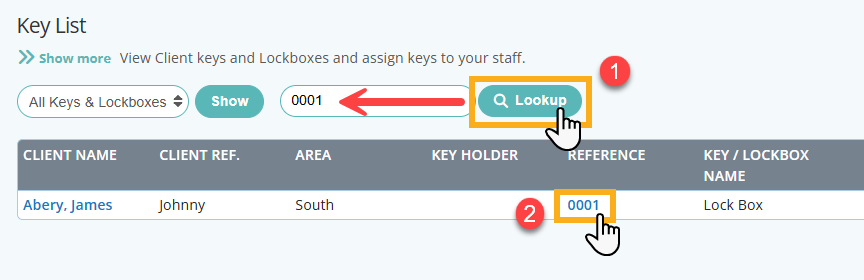
Step 1
- Enter Reference or Key Number into the search field.
- Click "Lookup"
- To find out more about the key, click the key reference.
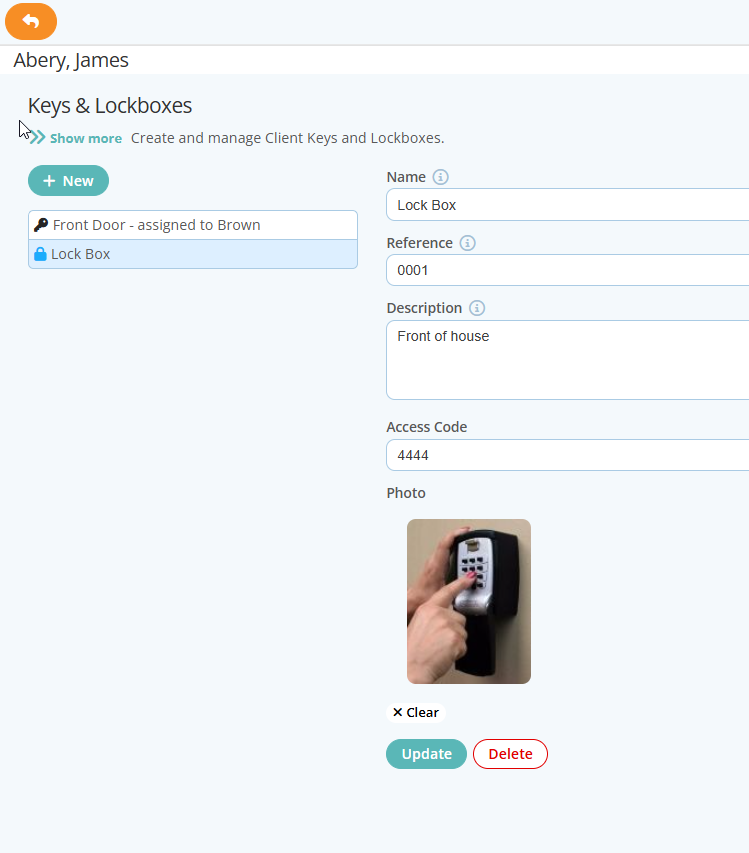
Step 2
- Click the key reference to access the key record to make updates such as assign the key, view last key assignment and update key information.
Was this article helpful?
That’s Great!
Thank you for your feedback
Sorry! We couldn't be helpful
Thank you for your feedback
Feedback sent
We appreciate your effort and will try to fix the article