Note: Two-Factor Authentication may have already been enabled as your Company default and may not be visible on your preferences.Using Two-Factor Authentication (2FA) adds an essential layer of security that helps protect your account from unauthorised access. Enabling Two-Factor Authentication means even if someone manages to obtain your password, they cannot log in without the second verification step. This greatly reduces the risk of data breaches and keeps all your sensitive information safe.
Its quick and easy to access your account when Two-Factor Authentication is enabled. Login as normal and Pet Sitter Plus will automatically email a 6‑digit verification code which you simply copy and enter in the box provided when prompted.
Navigation: Profile > Preferences
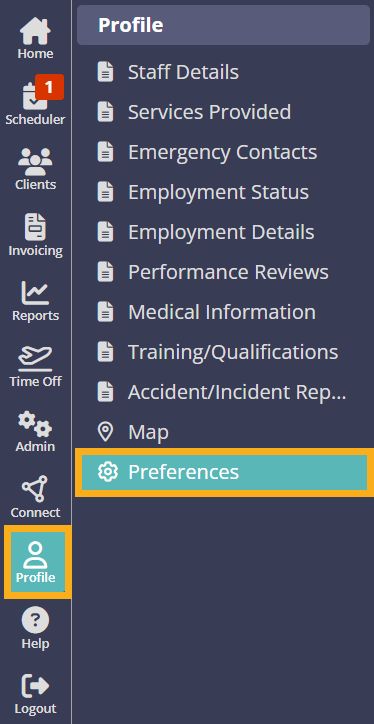
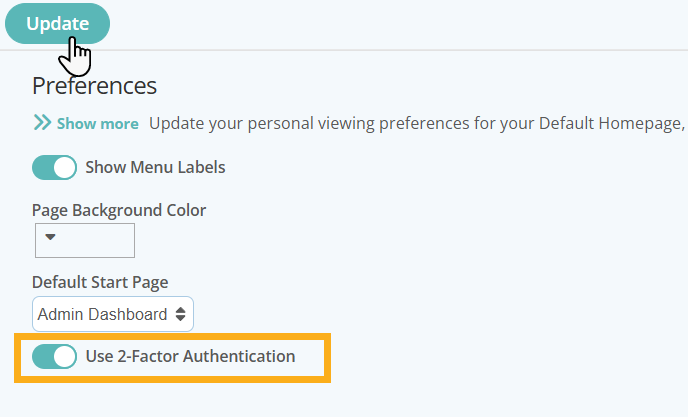
- Switch ON "Use 2-Factor Authentication"
- When you next log into your account, a 6‑digit verification code is automatically emailed to you.

- Copy the Code and then paste, or enter in the Confirmation Code box provided on the login page.
- Click "Submit".
Was this article helpful?
That’s Great!
Thank you for your feedback
Sorry! We couldn't be helpful
Thank you for your feedback
Feedback sent
We appreciate your effort and will try to fix the article