Emailing your Clients is a fundamental feature within Pet Sitter Plus allowing you to communicate important information about your company services, availability or processes whenever needed.
There are multiple locations within your system where emails can be sent to your Clients such as directly from a Client Profile, the Schedules, Reporting module or even from your Client List.
As well as sending an adhoc or pre-defined email templates, you can also attach files to emails sent directly from Pet Sitter Plus.
Whether you're sharing pet care photos, sending important client forms, or attaching a price list, adding an attachment to an email is quick and straightforward.
From Where in Pet Sitter Plus Can I Send an Email Attachment?
Email attachments are available system-wide — from any location in Pet Sitter Plus where you can send an email, including:
- Client Profile
- Client List
- Orders & Invoices
- Schedule
- Service Requests
- Reporting
- Invoicing
- Visit/Service Reports
- Staff Profiles
- Staff List
How Do I Send and Email Attachment to a Client?
The email attachment option is available wherever you can compose and send an email in Pet Sitter Plus. The steps are the same throughout the system.
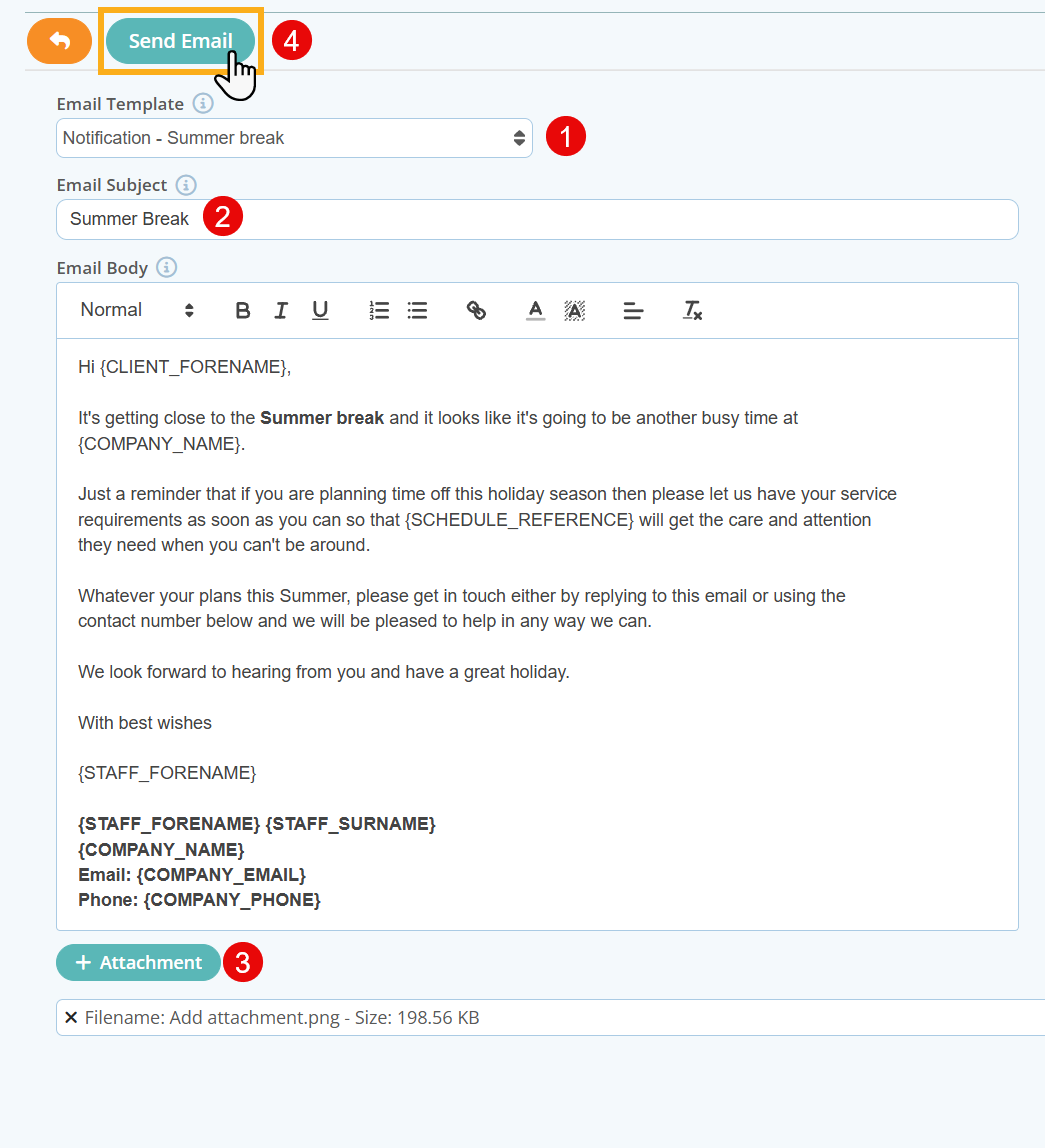
- Compose your email or Select an Email Template from the drop down list
- Enter a Subject Line
- Click the "+Attachment" button and select your image or PDF from your device directory
- The attached file will appear listed below the attachment button once selected. Repeat to add further attachments, up to a maximum of five
- Click "Send Email."
Info: Key Information about Email Attachments:
- Supported File Types: .jpeg, .jpg, .png, .pdf
- Maximum File Size: 5 MB
- Maximum Attachments: 5 attachments per email
What Sort of Attachments Can I Send to My Clients?
Here are some are some examples of ways you and your team can make use of email attachments:
Client Forms & Paperwork
Send intake forms, vet release forms, consent forms, or care instructions directly to your clients as PDF attachments. Clients can complete them and return them to you without the need for printing or posting — making your onboarding process faster and more professional.
Price Lists & Service Updates
Attach your latest pricing or a seasonal service update as a PDF to keep clients informed. Everything they need arrives directly in their inbox, professionally presented.
Important Notices
Share policy updates, holiday availability notices, or other important communications with supporting documentation attached.
Pet Care Photos
Send photos of pets in your care directly to their owners via email — a great complement to the existing Service Reporting feature. Receiving a photo of their pet during a visit or walk builds real trust and loyalty with your clients.
Pet Birthday Celebrations ?
Pet Sitter Plus includes a Pet Birthday feature — and now you can take it a step further. Attach a birthday photo of a pet and send their owner a personal message that will genuinely make their day.
Info: Further reading:
Was this article helpful?
That’s Great!
Thank you for your feedback
Sorry! We couldn't be helpful
Thank you for your feedback
Feedback sent
We appreciate your effort and will try to fix the article