TABLE OF CONTENTS
- How Do I Configure Service Availability Settings?
- Can I Restrict Bookings For Any Date or Time?
- Can I Make A Specific Service Group or Service Item Unavailable?
- What Happens When a Client Requests an Unavailable Service in the Client Portal?
- Further Reading on How To Set Each Service Availability Options
Service Availability Controls allow business owners and administrators to define when clients can request services through the Client Portal. By setting these parameters, you can ensure that client requests align with yours and your team’s working hours and availability and help prevent double bookings, scheduling conflicts, or unexpected service requests during out-of-hours.
These controls let you automatically block or restrict service requests during times when your business isn’t operating, such as:
Outside of normal business hours or days – for example, to prevent clients from requesting services on weekends when your business is closed.
On public holidays – such as Christmas Day or New Year’s Day, when your team may not be available.
During company vacations or closures – for example, if your business takes a planned break in August, you can block all client requests for that period.
You can also apply these restrictions at different levels, depending on how you want to manage availability:
All Services – block requests across your entire business.
Service Groups – restrict availability for a specific category of services (for example, dog walking, cat visits or boarding).
Individual Services – control availability for a specific type of service, such as daycare or grooming.
Example Scenarios
Here are a few common reasons why a business might use Service Availability Controls:
To avoid staff being booked outside of normal working hours, such as late-night or early-morning requests.
To pause bookings during holidays, ensuring clients can’t request services while the business is closed.
To control seasonal demand, for instance, stopping new bookings during particularly busy times when you’ve already reached capacity.
To maintain clear client expectations, ensuring clients always see accurate regular service availability and only request services when your business is operational
How Do I Configure Service Availability Settings?
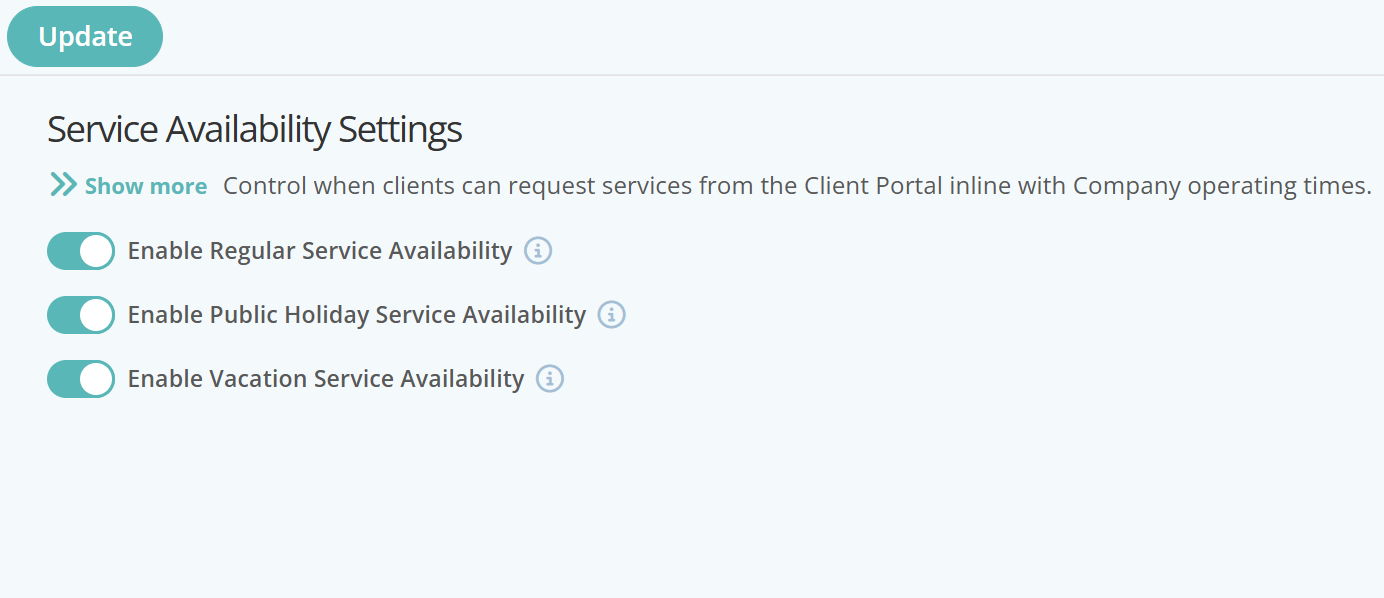
Firstly you will need to enable or disable your Service Availability Settings.
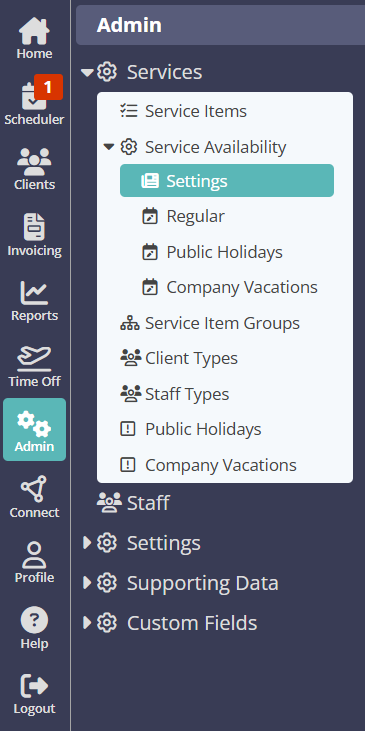
Navigation: Admin > Services > Service Availability > Settings
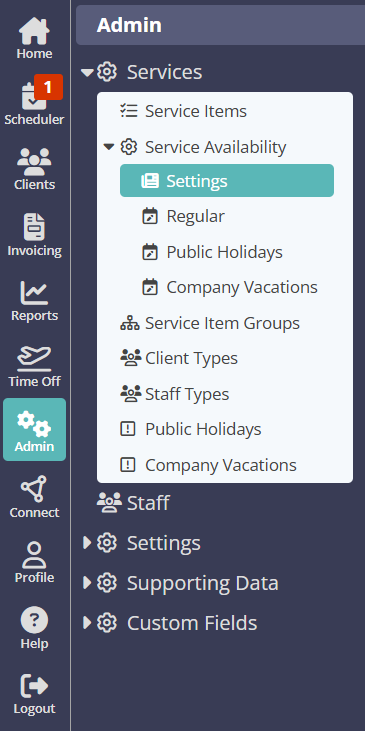
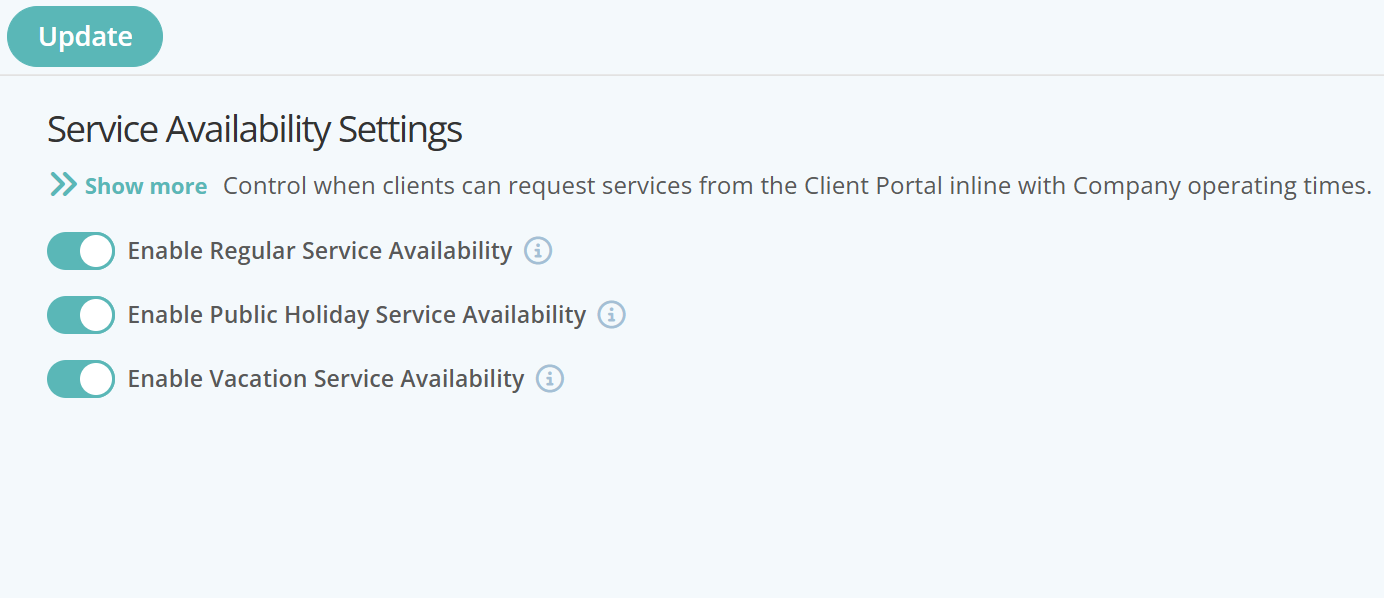
From the Settings page, enable the service availability settings relevant to your business:
- Enable Regular Service Availability - Restricting or blocking service requests outside of normal business operating days/hours
- Enable Public Holiday Service Availability - Restricting or blocking service request for public holidays
- Enable Vacation Service Availability - Restricting or blocking service requests for company vacations or other closures
To enable or disable any of the Service Availability Settings, simply switch ON the relevant button.
Can I Restrict Bookings For Any Date or Time?
Once Regular Service, Public Holidays or Company Vacation availability have been enabled as indicated above, further options are available to set booking availability for specific dates, days or times:
- Set the days of the week your business provides services
- Set specific shifts within the days of the week your business provides services
- Set Public Holiday or Company Vacation days off in conjunction with the relevant calendars in Admin > Services
- Set specific availability at Service Groups or Individual Service level.
Navigation: Admin >Services > Service Availability > Settings > Regular
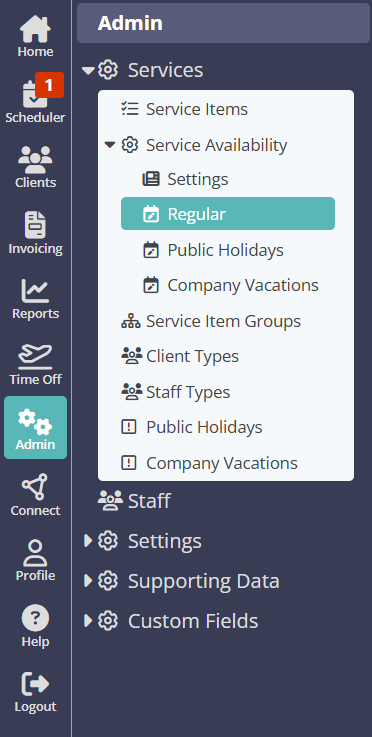
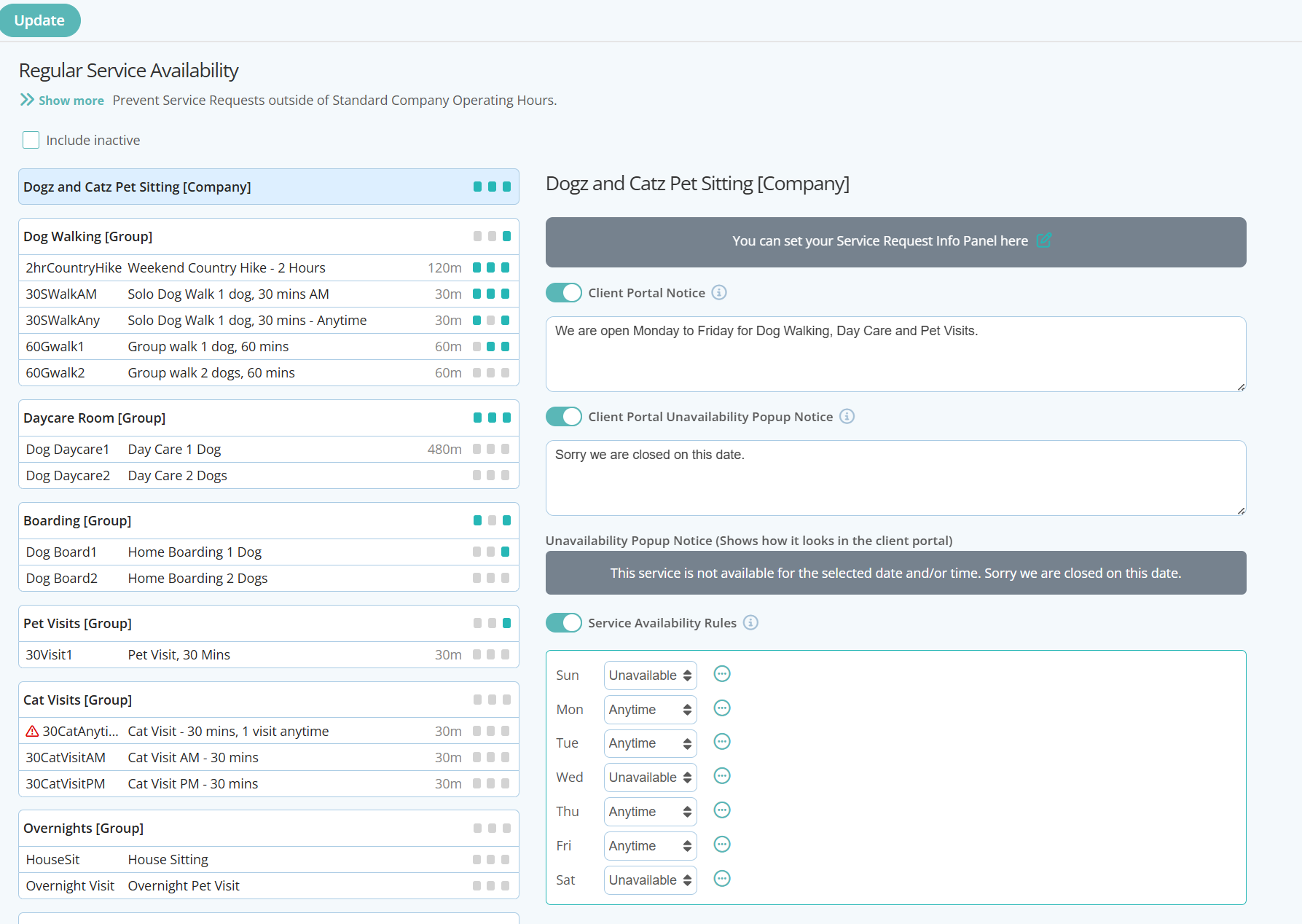
For each Service Availability page, there are options for adding:
- Client Portal Notice: A general notice to allow admins to set a company message for clients that can be displayed in the client portal giving either general instructions for booking/requesting or even paying for services, or notice of up and coming closures etc
- Client Portal Unavailability Pop Up Notice: If the service requested falls outside of your company's service availability settings, a notice is displayed that is pre-populated by admins detailing the reason for the unavailability.
- Service Availability Rules: Set service availability rules for each day of the week. These will be reflected in Regular Business services, Public Holidays or Company Vacations. The options are:
- Unavailable - Mark the day as not available and prevent any booking/service request
- Anytime - Marks the day as being available to book/request a service
- Custom - Set time parameters whereby some parts of the day are available to be booked. There are 4 shifts available for time blocks to be set.
Can I Make A Specific Service Group or Service Item Unavailable?
Service Availability can also be set for specific Service Groups or Service Items, This allows Business owners to set specific rules that may apply to differing Service Groups or items.
For example:
Regular Services - Dog Walking and Daycare services are only accessible Monday to Friday, whereas Boarding or Overnights are accessible over a weekend as well.
Public Holidays - Maybe your company closes for Public Holidays, yet still offers Boarding services to your customers.
Company Vacations - Your company shuts down over the Christmas Period, yet offers limited Boarding or House Sitting to your customers for this period.
Navigation: Admin > Services > Service Availability > Settings
From the Settings page, enable the service availability settings relevant to your business:
- Enable Regular Service Availability - Restricting or blocking service requests outside of normal business operating days/hours
- Enable Public Holiday Service Availability - Restricting or blocking service request for public holidays
- Enable Vacation Service Availability - Restricting or blocking service requests for company vacations or other closures
To enable or disable any of the Service Availability Settings, simply switch ON the relevant button.
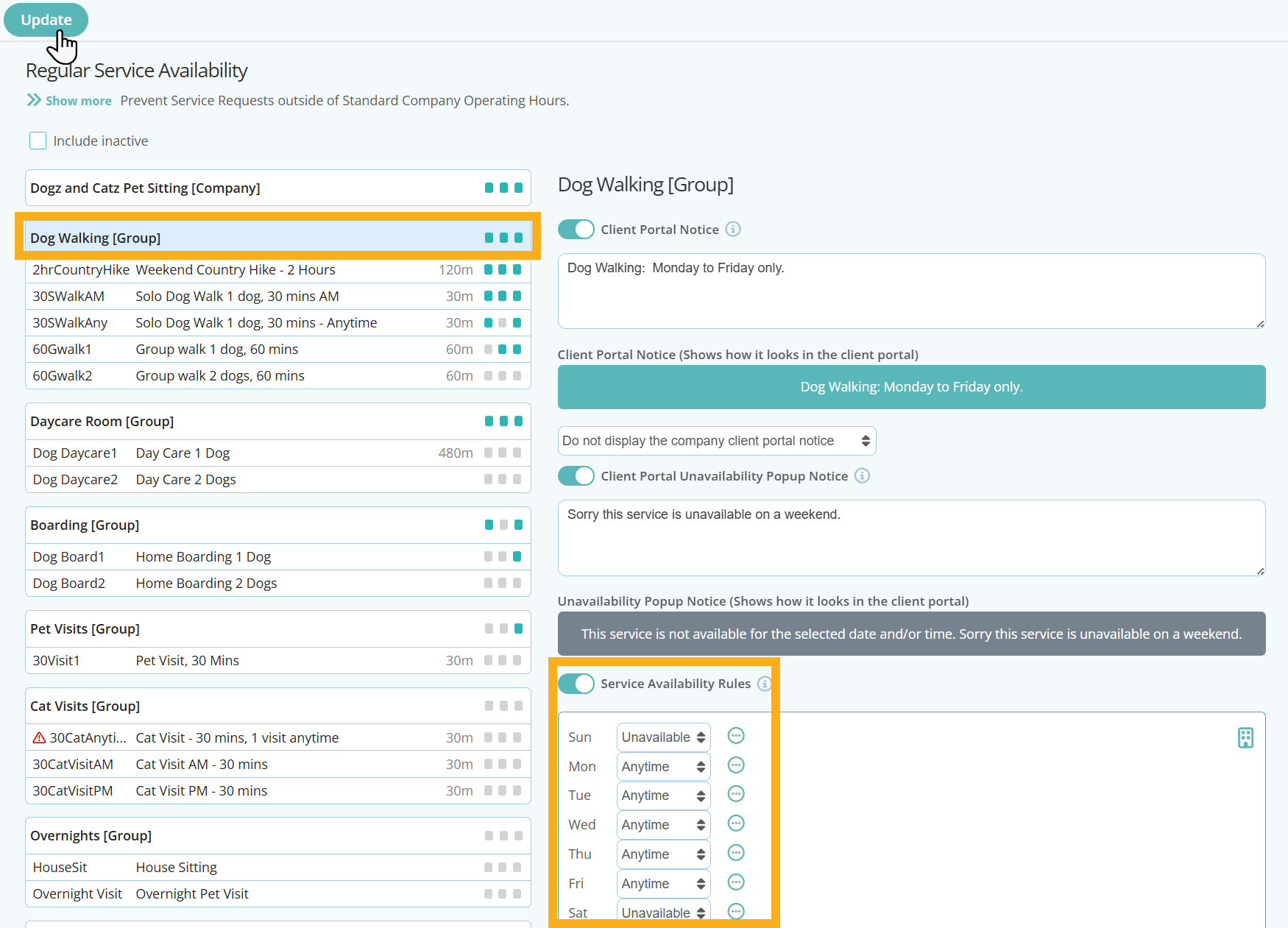
Once enabled, you have options for:
Adding a Client Portal Notice - Choose whether or not to show this notice in addition to the Company Client Portal Notice. An example of how this will look in the client portal is in the green box.
Add a Notice if a Service is Unavailable - Use this option to add a specific notice to the client if the service group is not available to book, such as " Sorry, Dog Walking is only available Monday - Friday"
Service Availability Rules - Set daily rules to determine whether the service is available to book in the Service Request Page of the Client Portal. Options are:
- Anytime - The Service is available to book at anytime
- Custom time - The service is available to book, but only within the custom shift blocks set. There are up to 4 different shifts available whereby you can set available times such as: 10am - 11am, 12pm-1pm, 1pm - 2pm etc.
- Unavailable - The service is not available to book on that particular day of the week and is blocked/greyed out from the client portal service request calendar
- Or to set Service Availability at Service level:
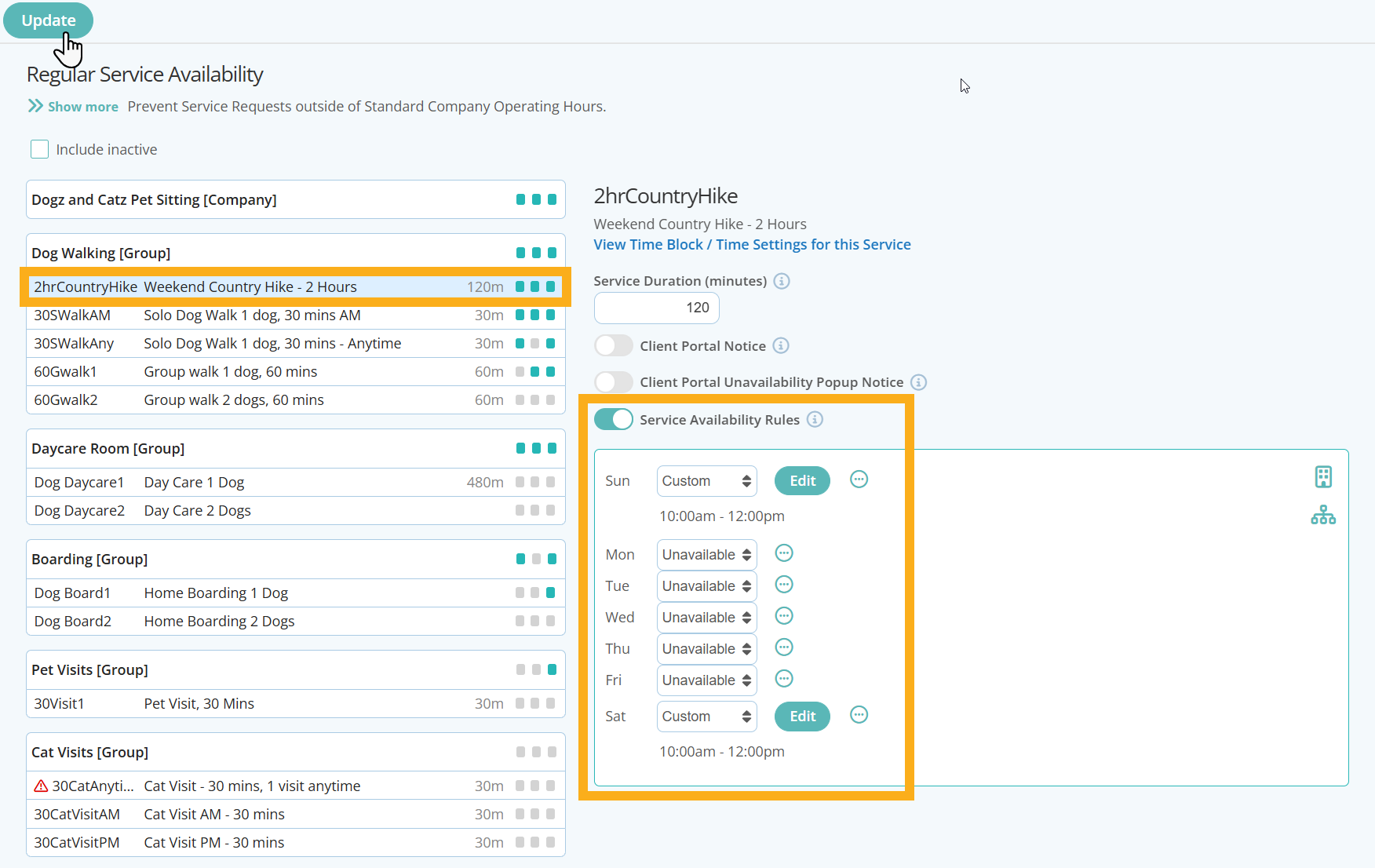
Once enabled, you have options for::
Adding a Client Portal Notice - Choose whether or not to show this notice in addition to the Company Client Portal Notice. An example of how this will look in the client portal is in the green box.
Add a Notice if a Service Item is Unavailable - Use this option to add a specific notice to the client if the service item is not available to book, such as " Sorry, 30 min Solo Dog Walking is only available Monday - Friday"
Service Availability Rules - Set daily rules to determine whether the service is available to book in the Service Request Page of the Client Portal. Options are:
- Anytime - The Service is available to book at anytime
- Custom time - The service is available to book, but only within the custom shift blocks set. There are up to 4 different shifts available whereby you can set available times such as: 10am - 11am, 12pm-1pm, 1pm - 2pm etc.
- Unavailable - The service is not available to book on that particular day of the week and is blocked/greyed out from the client portal service request calendar
What Happens When a Client Requests an Unavailable Service in the Client Portal?
When a client requests a service on a day or for a period you have set as unavailable, they will be unable to select the date, and it will be greyed out. They will also be shown any client portal notices you have set in your Service Availability Settings:
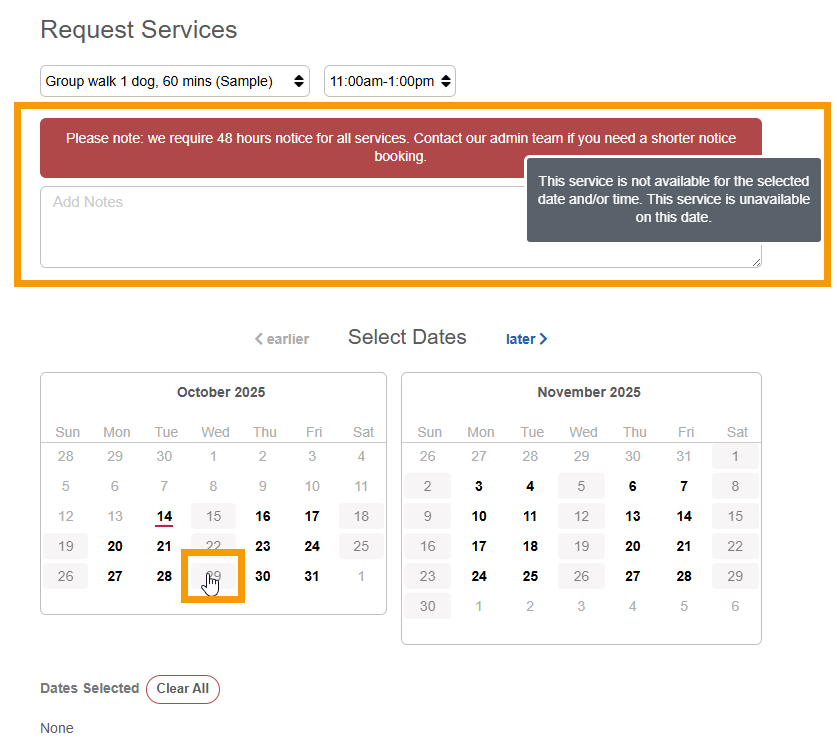
You can also add a Service Request Information Notice to display at the top of the Request Services Page to communicate Service Availability, Service Restrictions or even guidance on how to Request Services.
Info: Further Reading on How To Set Each Service Availability Options
- What are Services Availability Rules
- Set the days of the week your business provides services on a regular basis.
- Set Public Holiday days off in conjunction with the Public Holiday Calendar in Admin > Services
- Set Company Vacation days off in conjunction with the Company Vacation calendar in Admin > Services
- Add a Message to the Service Request Page in the Client Portal
- Add a Client Portal Notice
- Create a Service Unavailable Notice
Was this article helpful?
That’s Great!
Thank you for your feedback
Sorry! We couldn't be helpful
Thank you for your feedback
Feedback sent
We appreciate your effort and will try to fix the article